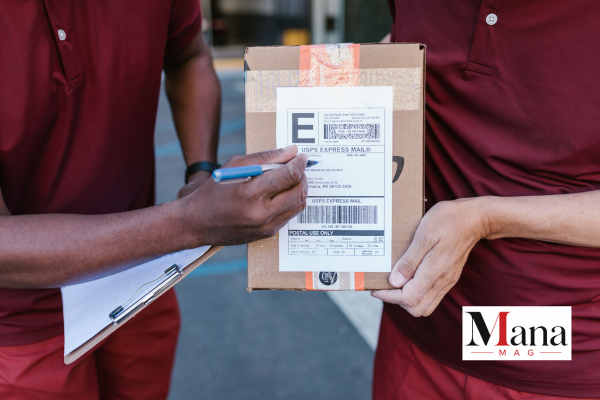
A USPS tracking number is the code that tells you exactly where your mail or package is at any given moment, from the second it’s scanned at the post office to the moment it lands on your doorstep. This covers where to actually find yours depending on how you shipped, what the different formats mean, how to look one up if tracking isn’t updating the way you expect, and a scam pattern tied to this exact search term that’s worth knowing about before you click anything in a text message claiming to be from USPS.
What a USPS Tracking Number Looks Like
USPS doesn’t use one single format across every service. The length and structure change depending on what you’re shipping and how.
| Service | Typical Format | Example Pattern |
| USPS Ground Advantage | 22 digits, starts with 9400 | 9400 1000 0000 0000 0000 00 |
| Priority Mail | 22 digits, starts with 9205 or 9200 | 9205 5000 0000 0000 0000 00 |
| Certified Mail | 20 digits, starts with 9407 or 7000-7999 | 9407 3000 0000 0000 0000 00 |
| Priority Mail Express | 13 characters, two letters + 9 digits + “US” | EA 123 456 789 US |
| Registered Mail | 13 characters, starts with “R”, ends “US” | RA 123 456 789 US |
| International (Priority Mail International) | 13 characters, letters + digits + “US” | CP 123 456 789 US |
A few practical takeaways from this table:
- If your number is all digits and 20 to 22 characters long, it’s domestic. The specific starting digits point to the service type, though USPS doesn’t publish these prefix assignments as a fixed, unchanging public reference, so treat the examples above as a general guide rather than a strict lookup table.
- If you see letters mixed into the number itself (not just prefixes), you’re probably looking at an international or Priority Mail Express number, not a standard domestic one.
- If your tracking number starts with “1Z,” that’s UPS, not USPS. This mix-up happens more than you’d expect, especially with third-party sellers who sometimes switch carriers without clearly saying so.
Where to Actually Find Your Tracking Number
Where you look depends entirely on how the package was shipped and who shipped it.
If You Mailed the Package Yourself
- On your receipt, usually in the upper or lower section, often labeled “Tracking Number” or simply “Track.”
- On the shipping label itself, printed directly above or below the barcode.
- In your email, if you purchased postage online through Click-N-Ship. The confirmation email includes the tracking number directly.
- In your USPS account, under shipping history, if you created an account when you paid for postage.
If Someone Else Shipped It to You
- Check your order confirmation or shipping confirmation email from the retailer. Most online sellers include the tracking number directly in a “your order has shipped” email.
- Log into your account on the retailer’s website and check the order details page, which usually links directly to tracking.
- Ask the sender directly if you’re expecting a personal package (not a retail order) and haven’t received any tracking information yet.
How to Look Up a Tracking Number
Once you have the number itself, looking it up is simple:
- Go to USPS.com and find the tracking search box on the homepage.
- Enter the tracking number exactly as shown, digits only, no need to include spaces even if the number is displayed in groups.
- Press search. You’ll see the current status, the most recent scan location and timestamp, and the full tracking history if you click through.
- If nothing comes up, double-check for a mistyped digit before assuming something’s actually wrong, since a single incorrect digit is the most common reason a lookup fails.
You can also track packages through the USPS mobile app, or by texting your tracking number to 28777 (2USPS) once you’ve signed up for text tracking updates.
Why Tracking Sometimes Isn’t Updating
This is one of the most common frustrations people run into, and it’s rarely as alarming as it feels in the moment:
- The package hasn’t been scanned yet. A tracking number becomes active once USPS actually scans the package, which can be hours or even a day or two after a shipping label is printed. A label being created isn’t the same as the package being in USPS’s hands.
- Scans don’t happen at every single step. Between major processing points, a package can go a day or more without a new scan even though it’s still moving normally.
- High-volume periods slow things down. Around holidays especially, scanning delays are common and don’t necessarily mean anything has gone wrong.
If tracking hasn’t updated in several days and the estimated delivery window has passed, that’s the point where it’s worth contacting USPS directly rather than continuing to wait.
A Scam Worth Knowing About Before You Search Further
This is genuinely important, and it’s specifically relevant to anyone searching for tracking number information: USPS has repeatedly and publicly warned about a widespread text message scam known as smishing (SMS phishing) built around exactly this topic.
Here’s how it works: you receive an unsolicited text claiming a USPS package can’t be delivered, often citing a vague issue like an incomplete address, and asking you to click a link to resolve it. The link leads to a fake site designed to steal personal or financial information.
The key fact that exposes this scam every time: USPS will not text you about a package unless you specifically signed up for tracking updates and provided a tracking number yourself. An unsolicited text about a delivery problem, especially one urging you to click a link quickly, did not come from USPS.
A few concrete rules from USPS’s own guidance:
- Legitimate USPS tracking texts, sent only after you request them, will not contain a link.
- USPS will never ask for personal information, account numbers, or payment through a text message.
- If you get a suspicious message, don’t click anything. Take a screenshot and forward it to spam@uspis.gov, or forward the text itself to 7726 (SPAM).
- If you’re unsure whether a delivery issue is real, check directly on USPS.com using the tracking number from your own order, not a link from an unexpected text.
Bottom Line
Your USPS tracking number is usually easy to find, on your receipt, shipping label, or a shipping confirmation email, and once you have it, USPS.com gives you the fastest, most direct lookup. If tracking seems stalled, give it a little time before assuming something’s wrong, since scanning gaps are normal. And if a text message shows up claiming there’s a delivery problem you need to resolve by clicking a link, treat it as a scam by default unless you specifically signed up for that exact tracking alert yourself.
FAQ
How many digits does a USPS tracking number have?
Most domestic USPS tracking numbers are 20 to 22 digits. Some services, like Priority Mail Express and international shipments, use a shorter 13-character format that mixes letters and numbers, typically starting with two letters and ending in “US.”
Where do I find my USPS tracking number if I shipped the package myself? Check your mailing receipt, the shipping label itself near the barcode, or your email confirmation if you paid for postage online through Click-N-Ship.
Why isn’t my USPS tracking showing any updates?
Usually because the package hasn’t been scanned yet, or because it’s between processing points where scans aren’t logged at every single step. This is especially common during high-volume shipping periods. It doesn’t necessarily mean anything has gone wrong.
Is it normal for USPS to text me about a package?
Only if you specifically signed up for text tracking and provided your tracking number. An unsolicited text about a delivery problem, especially one asking you to click a link, is very likely a scam and should not be trusted.
What should I do if I get a suspicious USPS text?
Don’t click any links. Take a screenshot and forward it to spam@uspis.gov, or forward the text message itself to 7726 (SPAM), which reports it directly.
My tracking number starts with “1Z.” Is that USPS?
No, that’s a UPS tracking number format, not USPS. This mix-up is common with online orders where the seller may use a different carrier than expected.

Must See
-


Sports
/ 2 months agoLos Angeles Chargers vs Detroit Lions Match Player Stats: 2025 Hall of Fame Game
The Los Angeles Chargers defeated the Detroit Lions 34-7 in the 2025 NFL Hall...
By Magzine -


Sports
/ 2 months agoPittsburgh Pirates vs Mets Match Player Stats: August 2026 Game Breakdown
The Pittsburgh Pirates and New York Mets produced two very different games during their...
By Magzine -


Sports
/ 2 months agoGolden State Warriors vs Orlando Magic Match Player Stats, Box Score and Game Analysis
The Golden State Warriors beat the Orlando Magic 120-97 on December 22, 2025, at...
By Magzine